2026a
Overview
This page explains how to reproduce the simulations and figures that were submitted to BioRxiv in May 2026.
Important notes
- FiberVent will only run on Windows PCs.
- Each simulation will take several hours to run on a single thread
- The manuscript summarizes results from hundreds of simulations. Generating the complete set of simulations could take a week on a laptop.
- The simulations can be generated using files from this repository and a Python environment that can be created via Conda.
- Creating the figures requires MATLAB which is a commercial product.
Instructions
Setup to run simulations
- Clone the FiberVent 1.1.2 repo to a local directory that will be referred to as
<FiberVent_repo> - Install Conda if not already available
- Install the FiberVent environment by
- opening a terminal and changing the directory to
<FiberVent_repo>/code/FiberVentPy/environment - run
conda env create -f environment.yml
- opening a terminal and changing the directory to
Run simulations
Warning - simulations take hours to run
These commands run simulations to create output files from which the figures are derived. Follow the instructions at Create figures to create the actual figures themselves.
- Open a terminal
- Activate the conda environment with the command
conda activate FiberVent - Change the working directory to
<FiberVent_repo>/code/FiberVentPy/FiberVentPy - To generate the simulations illustrated in Figures 1 and 2
- Run the command
python fiberventcpy.py characterize ../../../manuscripts/2026a/setup/setup_demonstrate_growth.json
- Run the command
- To generate the simulations illustrated in Figures 3, S1, S3, S4, and S7
- Run the commands
python fiberventcpy.py characterize ../../../manuscripts/2026a/setup/setup_scan_parameters.jsonpython fiberventcpy.py characterize ../../../manuscripts/2026a/setup/setup_valves_and_myofilaments.json
- Run the commands
- To generate the simulations illustrated in Figure S2
- Run the command
python fiberventcpy.py characterize ../../../manuscripts/2026a/setup/setup_growth_rates.json
- Run the command
- To generate the simulations illustrated in Figures S5 and S6
- Run the commands
python fiberventcpy.py characterize ../../../manuscripts/2026a/setup/setup_arteriolar_resistance.json
- Run the commands
Setup to create figures
- Clone MATLAB_UKTCVR to a local directory that will be referred to as
<UKTCVR_repo> - Start MATLAB
- Add
<UKTCVR_repo>/codeand its subfolders to the MATLAB path - Run
<FiberVent_repo>/manuscripts/2026a/MATLAB_code/collate_summary_files.m- This may take ~1 hour to parse data from each simulation file
Create figures
- Start MATLAB
- To generate the simulation time-courses illustrated in Figures 1, 2, S1, S3, S4, S5, and S6 figures
- Run
<repo>/manuscripts/2026a/MATLAB_code/figure_simulation_time_courses.m
- Run
- To generate the summaries of growth shown in Figure 3
- Run
<repo>/manuscripts/2026a/MATLAB_code/figure_xy.m
- Run
- To demonstrate the effects of altered growth rates shown in Fig S2
- Run
<repo>/manuscripts/2026a/MATLAB_code/figure_growth_rates.m
- Run
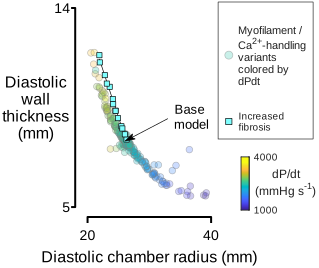
- To demonstrate the effects of fibrosis on growth shown in in Fig S7
- Run
<repo>/manuscripts/2026a/MATLAB_code/figure_xy_fibrosis.m
- Run
Output
Figure 1
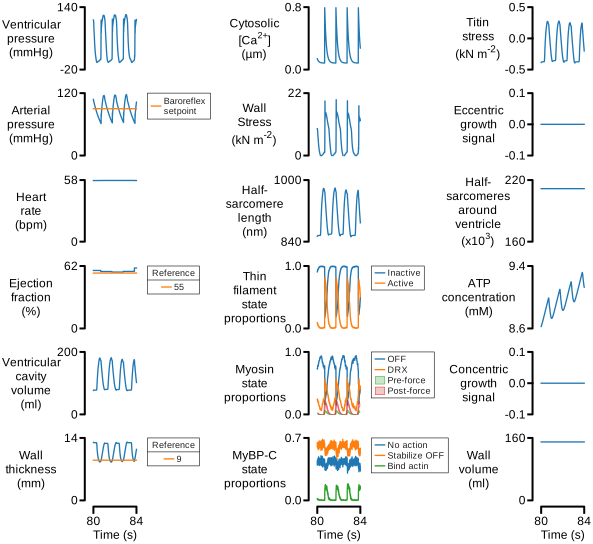
Figure 2
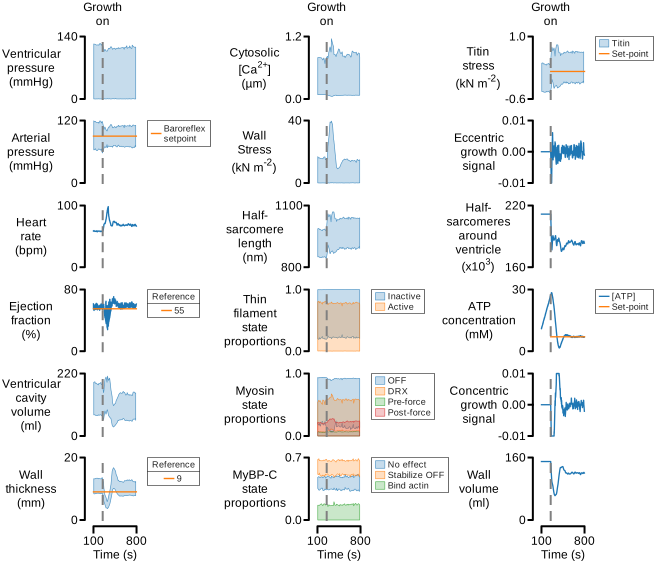
Figure 3
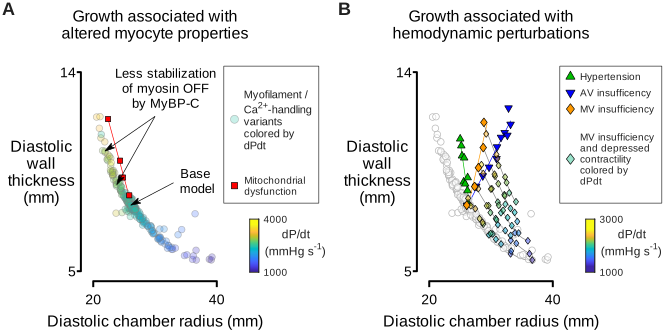
Figure S1
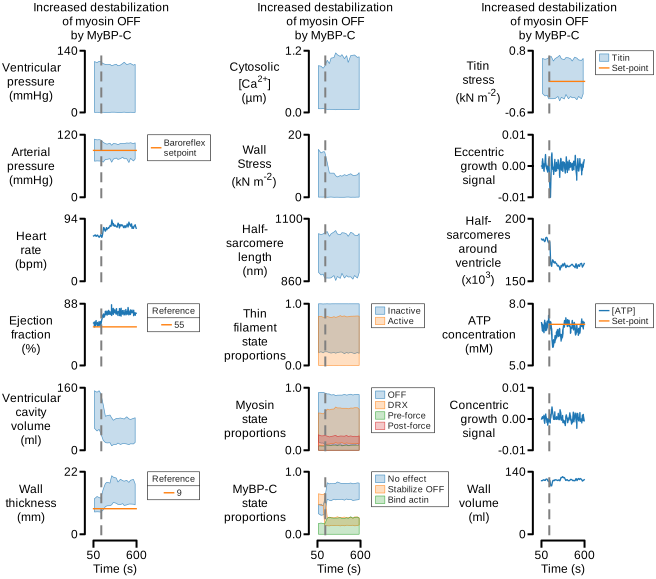
Figure S2
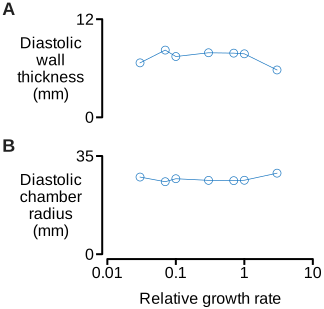
Figure S3
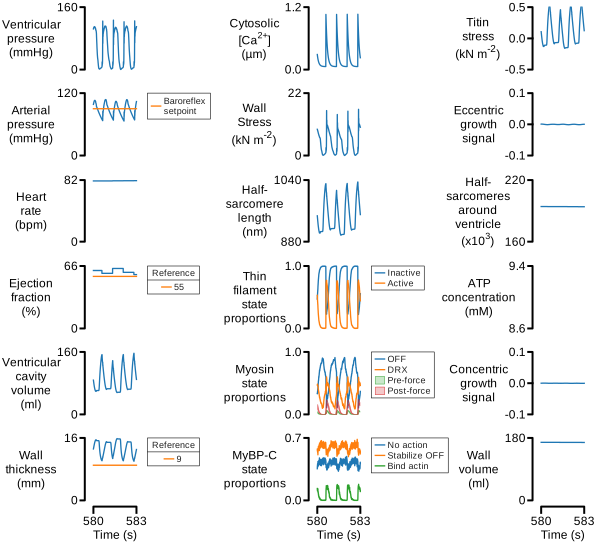
Figure S4
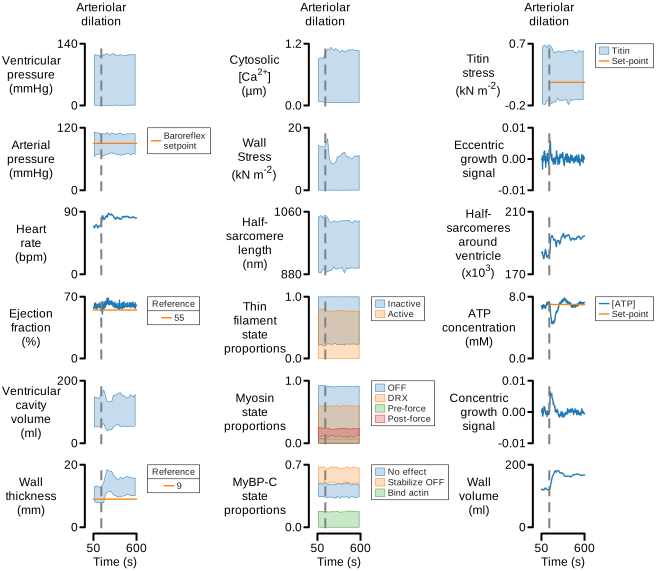
Figure S5
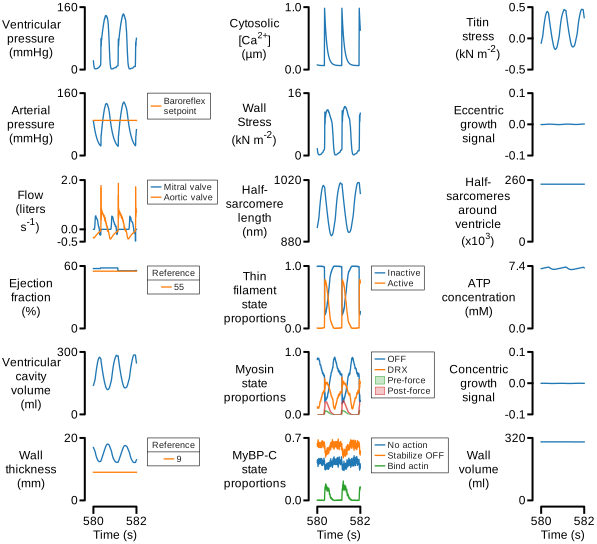
Figure S6
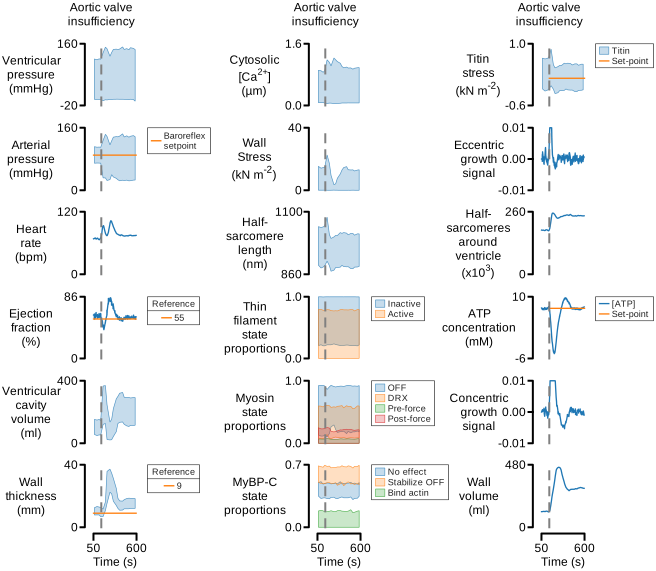
Figure S7